
Traditional Calendar Problems
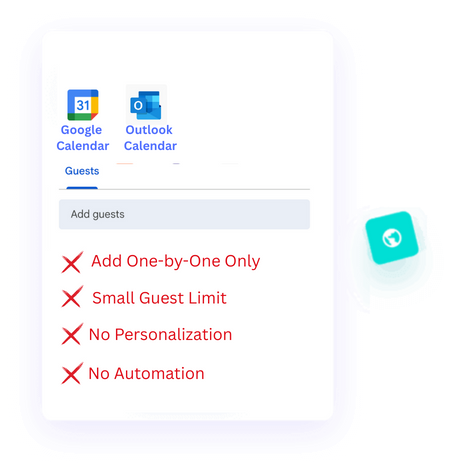
Google and Outlook
Slow You Down
They aren’t built to send large calendar invites, don’t let you add personal touches, and end up wasting hours you could spend on more important things.
No Mass Invites
You Waste Hours Adding Guests One by One - Then Hit the Limit.
No Personal Touch
Without Personal Touch, Your Invites Fail to Connect or Engage.
Traditional Calendar Problems
Google and Outlook
Slow You Down
They aren’t built to send large calendar invites, don’t let you add personal touches, and end up wasting hours you could spend on more important things.
No Mass Invites
You Waste Hours Adding Guests One by One -- Then Hit the Limit.
No Personal Touch
Without Personal Touch, Your Invites Fail to Connect or Engage.
Meet BulkCalendar
Purpose-Built Tool That Saves You Hours
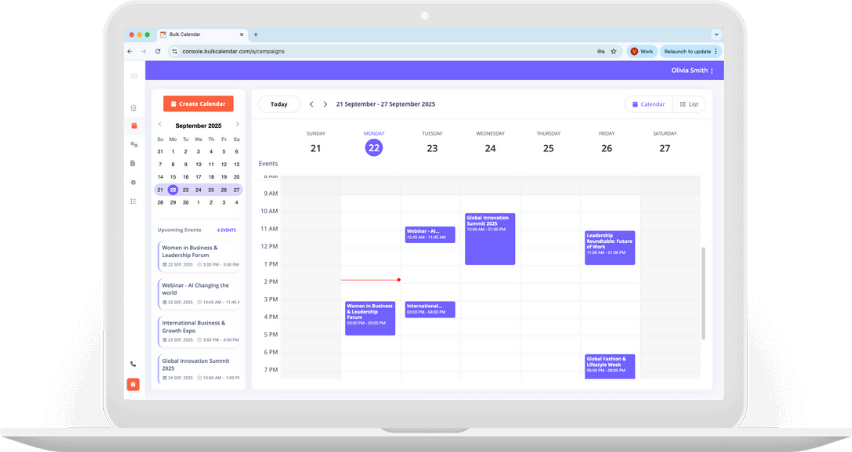
BulkCalendar makes sending, personalizing, and managing large calendar invites effortless — so you can focus on running your events, not fighting your calendar.
Mass Invites in Seconds
Send thousands of invites at once without guest limits or repetitive clicks.
Personalized for Every Guest
Add names, custom notes, and details so every invite feels personal and engaging.
Website & Apps
Next Generation Depends
on Softwares
Energistically conceptualize clients-focused data and user-centric process Energistically communicate installed base web
Awesome Support
Clients-focused data centric process energistically communicate installed done.
Market Research
Clients-focused data centric process energistically communicate installed done.
Easy Steps
How IT Works
Save hours of manual work - in just 3 simple steps, personalise every invite and send them directly from your own email and domain.
Create Calendar
Add a Personal Touch, Use First Names or Any Data You Choose
Import Guests
Copy-paste thousands of emails, or upload a CSV or Excel file
Send
Send securely from
your own email or domain
Other benefits
More Power. Less Effort.
BulkCalendar isn’t just a calendar tool - it’s your speed, your brand, and your security all in one place.
Secure Data Storage
Your data is protected with AES-256 encryption — the same standard used by global banks.
Send from Your Email & Domain
Build trust and brand recognition by sending directly from your own email and domain.
No Sending Limits
Reach hundreds or thousands without worrying about caps like Google or Outlook impose.
Email Integrations
Works with SendGrid, Brevo, Mailgun & more for reliable, high-deliverability sending.
Automate Your Invites
Schedule recurring or triggered invites so you never have to send manually again.
Zero Learning Curve
With a simple, intuitive design, you’ll start sending calendar invites in minutes

Compatibility
Works with Every Calendar
Send calendar invites that work seamlessly across all major apps - Google, Outlook, Apple, Yahoo, and more. So your attendees never miss an event.
Start Sending Your Calendar Invites
Use your Google or Microsoft account to schedule, personalize, and send calendar invites effortlessly.
Get Started
Users All Around The World
Millions of Invites Sent Worldwide
Millions of calendar invites are sent worldwide using BulkCalendar, helping teams send bulk and mass calendar invitations effortlessly. From large events and webinars to sales meetings and training sessions, users rely on fast, reliable, and personalized calendar scheduling at scale - without manual work.
Users
Higher Guest Turnout
Calendar Invites/Month
HAVE ANY QUESTIONS ?
Freequently Asked Questions
Find clear answers to the most common questions about sending bulk & mass calendar invites. Learn how to create, personalize, and manage bulk meeting invites quickly and reliably with BulkCalendar.
-
01. Will the invite be sent from my own email address?
Yes. When you send bulk meeting invites in Outlook or send bulk meeting invites in Gmail through BulkCalendar, you can use your own verified email domain.
This ensures recipients recognize the sender immediately. Using your own address improves trust, brand consistency, and open rates. For organizations, this is critical to maintaining professional communication. -
02. How do you handle security and guest data?
Data privacy is a priority. Contact lists are processed solely for delivering your invitations.
Whether you are managing mass calendar invites in Google ecosystems or distributing a bulk calendar invite in Outlook format, guest information remains controlled and protected.
BulkCalendar is designed for organizations that require secure, compliant event communication. -
03. Can I personalize the invite for each guest?
Yes. BulkCalendar allows you to personalize your calendar invitations using dynamic fields such as first-name, last-name, field1, or field2.
As long as your Gmail or Outlook account is connected, you can include these fields inside your message and BulkCalendar will automatically replace them for each recipient.
This makes it possible to send bulk meeting invites while still keeping each invitation personalized and professional. -
04. Can I import my guest list from Excel or Google Sheets?
Yes. To help you send multiple calendar invites quickly, BulkCalendar supports direct imports from Excel and Google Sheets.
This eliminates manual entry and reduces the risk of errors. It is especially helpful if you plan to send bulk meeting invites in Gmail or Outlook without copying and pasting addresses individually.
The result is a faster and more organized invitation process. -
05. If I update the event in BulkCalendar, will it also update guest's calendar?
Yes. If you modify the time, date, or location after sending your invitations, BulkCalendar distributes the update to your guests.
Whether you originally sent bulk calendar invites in Google or created a bulk calendar invite in Outlook format, recipients receive the updated details.
This keeps everyone aligned and reduces confusion when event changes occur. -
06. How can I send bulk meeting invites to a large group at once?
To send bulk meeting invites to a large group, you need more than a standard calendar app. Tools like Outlook or Gmail work well for small meetings, but they are not designed for inviting hundreds of people at once.
BulkCalendar allows you to create one event and upload your full guest list in minutes. Instead of adding contacts manually, the system distributes individual invitations automatically. Each recipient receives a proper calendar invite that works across major platforms.
This makes it ideal for webinars, internal announcements, training sessions, and large-scale events where speed and reliability matter. -
07. Can I send mass meeting invites for marketing events and webinars?
Yes. BulkCalendar is built specifically to send mass meeting invites for marketing campaigns, webinars, and product launches.
Trying to send mass meeting invites in Outlook or Gmail directly can trigger guest limits or delivery issues. Our platform separates event creation from distribution, which helps ensure higher deliverability and better control.
This approach is especially useful for marketing teams that need structured, large-scale event communication without manual work. -
08. How do I send bulk calendar invites to hundreds of recipients?
To send bulk calendar invites at scale, you need a system that supports high-volume distribution. Standard calendar tools are not optimized for this.
With BulkCalendar, you import your recipient list from Excel or Google Sheets and create the event once. The platform then generates and sends individual invitations for each guest.
Whether you need a bulk calendar invite in Outlook format or one compatible with Google Calendar, every attendee receives an invitation they can add instantly.